
Homes And Rentals
Houston Association of REALTORS®House & Home
4.81.59K Reviews
- Version
- 4.2.19
- Installs
- 500.00K
- Age Rating
- Everyone
Screenshots
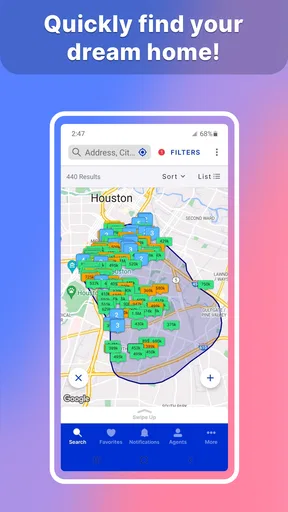
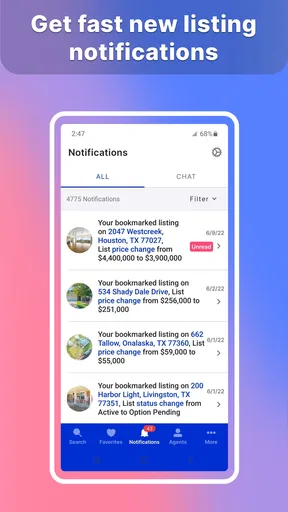
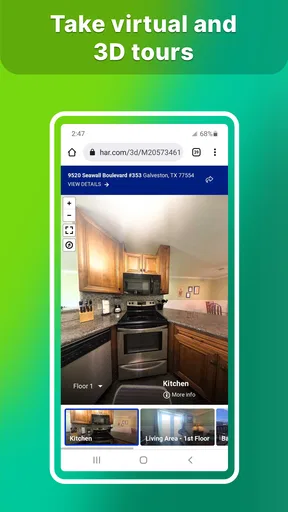
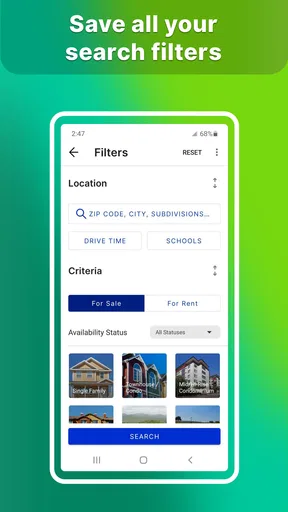


Our Review of Homes And Rentals
 Analysis by Appyee
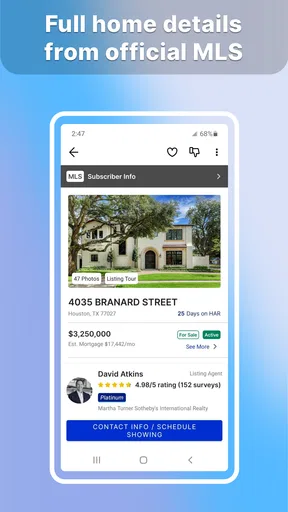
When I look for a home, I usually want one thing before anything else: information that feels current enough to act on. That is the main reason Homes And Rentals stands out to me. It is a free House & Home app from the Houston Association of REALTORS®, built around connecting people with MLS information and making the search feel less detached from the local market.
I approached Homes And Rentals as someone comparing real places rather than casually browsing pictures. In that role, its strongest quality is not decoration or entertainment. It is the chance to organize a serious property search around listings associated with the Houston real estate market, instead of relying only on broad rental or home-search services that can feel crowded with unrelated results.
The app has been available since September 19, 2011, and its current version is 4.2.19. It is rated for Everyone, works from Android 7.0 onward, and has passed the half-million-install mark. Those details matter because this is not a brand-new experiment; it is an established tool aimed at people who want a practical starting point for finding homes and rentals.
Why current MLS information changes the search
The most meaningful capability here is access to up-to-date MLS data. In everyday use, that can change how I judge a listing. A property search is not only about finding attractive rooms. It is also about knowing whether a result is still relevant enough to investigate, whether the asking information appears timely, and whether I am wasting energy on options that no longer deserve attention.
That does not make the app a substitute for personal verification. I would still contact the responsible REALTOR® or property representative before making plans, and I would never treat an app listing as a final promise about availability, condition, fees, or a move-in date. What the MLS-centered approach gives me is a more focused first layer: I can begin with information connected to the local professional real estate ecosystem rather than starting from a random collection of advertisements.
The practical advantage is reduced search noise. When I am comparing several neighborhoods, the difference between a general classifieds experience and a locally oriented MLS search becomes noticeable. I can think in terms of actual homes and rentals that fit my area of interest, then use my own questions and follow-up calls to confirm the details that matter most.
This focus is especially useful for people who already know the broad area where they want to live. If I am moving to Houston, changing neighborhoods, or looking for a rental near a particular daily routine, I do not necessarily need an app that tries to cover every possible property market equally. I need a tool that helps me narrow the first pass and decide which listings deserve a closer look.
What I would do before opening the first listing
I would begin by writing down my non-negotiables: maximum budget, acceptable commute, number of bedrooms, preferred property type, and the date by which I need to move. This sounds simple, but it prevents the app from becoming an endless stream of attractive homes that do not fit my real situation.
Then I would use the search as a comparison workspace rather than a wish list. For each promising result, I would note the location, the parts of the description that affect daily life, and any question that needs confirmation. For example, a listing may look suitable until I consider parking, access to work, nearby services, or whether the layout works for the people who will actually live there.
That workflow is one of the less obvious strengths of a local MLS-focused app. It encourages me to treat listings as leads for a decision, not as complete decisions in themselves. I can move from broad discovery to a short list, and from that short list to direct conversations with a REALTOR® or other contact.
How the capability feels in a realistic search
Imagine that I am relocating for work and have only a weekend to explore. I would not want to spend the first morning opening old-looking advertisements or driving to addresses that are no longer useful. I would start by checking the available homes and rentals in the areas that fit my commute, then separate realistic candidates from properties that fail my budget or location requirements.
After that first pass, I would compare the remaining listings by practical fit. One might have a better location but less suitable space. Another might appear more comfortable but create a longer daily trip. A third could be appealing until I discover that an important detail needs clarification. The app helps with the discovery stage; my job is to avoid confusing discovery with proof.
Before arranging a visit, I would confirm that each property is still available and ask about any detail that could change the decision. This is where the app works best as part of a process. It can help me identify and organize possibilities, while direct contact and an in-person or properly arranged evaluation handle the parts an app cannot settle.
I would also avoid judging the quality of a listing solely by its photographs or brief wording. A useful habit is to create a short question list while browsing. I might ask about the exact location, availability, included features, application requirements, or other costs. Writing those questions immediately is more effective than trying to remember them after viewing many properties.
Where it is most useful
The strongest scenario is a focused search in or around Houston, especially when I want homes and rentals connected to a professional local listing source. Someone moving into the area can use it to build an initial map of possibilities before speaking with an agent. Someone already living nearby can use it to compare a move without beginning from scratch.
It can also help a renter who feels overwhelmed by the difference between browsing and acting. Instead of opening every result, I would select a manageable group, check how each one fits my routine, and prepare targeted follow-up questions. That is a better use of time than collecting dozens of screenshots with no clear next step.
For a buyer, the value is slightly different. A buyer may be at the very beginning of the process and simply need to understand what kinds of properties are appearing in preferred areas. The app can support that early orientation, helping turn vague ideas such as “somewhere near this part of town” into a more concrete set of neighborhoods and property possibilities.
Families can benefit from the same approach, although they should be particularly disciplined. A visually appealing home may still be a poor fit if the location does not work for school routines, commuting, childcare, or daily errands. I would use the app to identify candidates, then evaluate the surrounding area independently and verify every important practical detail.
The tradeoff between local focus and broad coverage
The local MLS emphasis is also the app’s clearest limitation for some people. If I am comparing properties across many states, planning an international move, or looking for a very specialized type of accommodation, a broader housing platform may be more convenient. A national service can make cross-market comparison easier, while this app’s appeal is strongest when the Houston-area context is relevant.
There is another tradeoff: current listing information does not eliminate the need for human follow-up. A property may change quickly, and the app cannot make my budget, commute, or personal priorities disappear. I still have to compare locations, ask questions, schedule contact, and verify the terms before taking action.
I also would not choose it as my only tool for evaluating a neighborhood. A listing-focused app can show me potential homes and rentals, but deciding whether I like the area requires a wider routine: checking travel times at realistic hours, considering nearby services, and thinking about how the location feels beyond the screen.
That is why I see the app as a strong first-stage and comparison tool rather than a complete relocation system. It helps me find and organize possibilities. It does not replace a financial plan, a careful viewing, professional advice, or the responsibility to read documents closely before committing.
How it compares with familiar alternatives
Compared with general classified-ad services, the Houston Association of REALTORS® connection gives this app a more property-search-specific identity. General services can be useful when I want a large variety of advertisements, but they may require more effort to separate relevant housing results from unrelated posts or inconsistent information.
Compared with large national real estate platforms, the appeal here is concentration. A national app may be better when I am moving between distant markets or want one interface for several regions. Homes And Rentals makes more sense when my search is tied to Houston and I value a local MLS-oriented starting point over maximum geographic breadth.
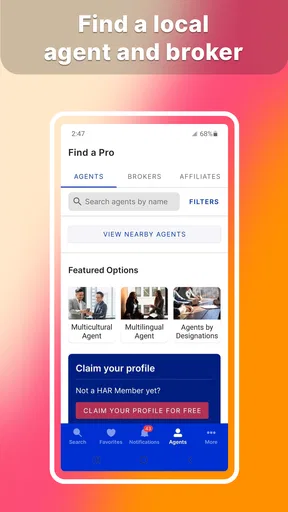
Compared with contacting a REALTOR® immediately, the app gives me more independence at the beginning. I can explore the market privately, clarify what I want, and arrive at a conversation with more specific questions. On the other hand, direct professional help can be better when I have a complicated situation, a tight deadline, or little knowledge of the local market.
My preferred approach would be to combine them: use the app to narrow the field, then use professional communication to verify and advance the best options. That avoids both extremes—depending entirely on unstructured browsing or asking someone else to begin the search without knowing what I actually need.
Small habits that make the app more useful
My first tip is to search with a decision in mind. Instead of asking whether I like a property, I ask whether it survives my basic filters: location, budget, space, timing, and daily practicality. This keeps attractive but unsuitable listings from taking over the search.
My second tip is to separate facts from impressions. I would record concrete details in one place and personal reactions in another. “Works for commute” is different from “looks bright in the photos,” and the first statement deserves more weight when I am deciding which listings to investigate.
My third tip is to contact the relevant professional with a concise list of questions. A clear message about availability, timing, and the details I need confirmed is more useful than saying only that I am interested. The app helps me discover the property; preparation helps me get a meaningful answer.
Finally, I would revisit my shortlist after a break. Looking at many homes in one sitting can make every listing blur together. Returning later with my original requirements helps me notice which options still fit and which were appealing only because they were new on the screen.
Who should use it and who should look elsewhere
I would recommend it to renters and buyers who are searching in the Houston area, prefer a locally connected source, and want to do meaningful research before making contact. It is also a good fit for people who like to compare options independently and want a straightforward way to begin with current MLS-oriented information.
I would be more cautious about recommending it as the primary choice for someone searching far outside that market, someone who needs highly specialized housing, or someone who expects an app to handle the entire process from discovery through closing or move-in. Those users may get more value from a broader service or from immediate help from a qualified local professional.
The app is free, which removes an obvious barrier to trying it. Its average rating is 4.8 from around 8.2 thousand ratings, with roughly 1.6 thousand written reviews, so its reception is notably strong. I would treat that as encouraging rather than as a reason to skip my own checks; property decisions are too personal for any rating to replace careful evaluation.
For me, the final verdict comes down to focus. Homes And Rentals is most convincing when I use it as a local MLS-based starting point: find plausible homes and rentals, compare them against real-life requirements, and then verify the details through the appropriate people and documents. It is not the broadest answer for every housing search, but for a Houston-centered search it offers a practical balance of independence and local relevance.
If that is the kind of search I am facing, I would keep it installed and use it early in the process. The best result is not simply discovering more listings. It is reaching a shorter, more sensible list of places that are worth my time.
Verdict
Strengths of Homes And Rentals
- Browse homes and rentals with detailed photos and property information.
- Useful search filters help narrow results by location, price, and home type.
- Save interesting listings for quick access and comparison later.
- Contact property owners or agents directly from many listings.
- Map-based browsing makes it easier to understand each property's location.
Limitations of Homes And Rentals
- Listing availability and accuracy may vary by location.
- Some properties may have limited photos or incomplete descriptions.
- Popular rentals can disappear before you have time to apply.
- Contact options and response times depend on individual advertisers.
- Advanced search features may require extra time to configure.
Similar Picks in This Category
View All
Universal TV Remote Control
CodeMatics Media Solutions3.9

AlfredCamera Home Security app
Alfred Systems Inc.4.7

Planner 5D: AI Home Design
Planner 5D4.5

Universal Tv Remote-Cast to TV
One Music Player4.1

Zillow: Homes for Sale & Rent
Zillow Group4.8

99acres Buy/Rent/Sell Property
infoedge.com4.3
Frequently Asked Questions
What is Homes And Rentals, and what can I use it for?
Homes And Rentals is a property-search app designed to help users browse available homes, apartments, rooms, and other rental properties in one place. After entering a preferred location, users can usually explore listings, review photos and descriptions, compare prices, and check important details such as the number of bedrooms, bathrooms, amenities, and nearby services before contacting a landlord or agent.
Does Homes And Rentals provide accurate and verified property listings?
The app can make searching more convenient, but users should still verify every listing before making a decision. Availability, prices, photographs, and property descriptions may change or may depend on information supplied by landlords, agencies, or third-party sources. Before paying money or signing an agreement, confirm the address, ownership or agency details, viewing arrangements, additional fees, and rental terms independently.
Can I contact landlords or property agents through the app?
Homes And Rentals may allow users to contact advertisers through in-app messaging, telephone details, inquiry forms, or other communication options shown on a listing. The exact contact methods can vary between properties and regions. When communicating, ask about availability, deposits, utilities, lease duration, application requirements, and viewing times, and avoid sending sensitive personal or financial information unnecessarily.
Is Homes And Rentals free to download and use?
The application may be free to download, although some features, listings, advertising options, or partner services could involve charges depending on the platform and location. Users should review the app-store description, subscription information, and any payment screen carefully before confirming a purchase. Remember that rent, deposits, agency fees, application costs, and moving expenses are separate from app-related charges.
What should I check before renting a property found on Homes And Rentals?
Before committing to a home found through Homes And Rentals, arrange a legitimate viewing whenever possible and compare the listing with the actual property. Confirm the landlord’s identity, written lease, total monthly cost, deposit rules, cancellation terms, included utilities, maintenance responsibilities, and local legal requirements. Be cautious of unusually cheap offers, pressure to pay quickly, requests for cryptocurrency, or anyone refusing a proper viewing.
